Speak the plan, then review it
Add and Change Family Calendar Events by Voice
KIN is a voice calendar app for families on iPhone and Android. Open the hold-to-talk control to add or change a shared event, reminder, to-do, or recurring plan in natural language. Review the interpreted date, time, recurrence, assignment, and reminder before your family relies on it. Typed input remains available when speaking is inconvenient.
Product proof
Voice calendar workflows tested end to end
We spoke each request through KIN's hold-to-talk control and checked the resulting local database record. The examples below show the interpreted request, recurring timeline, assigned reminder, and corrected event from that run.
Tested on: Tested August 15, 2026 on the KIN iPhone app 2.1 (build 9024) in an iOS 26.5 simulator against an isolated local test family.
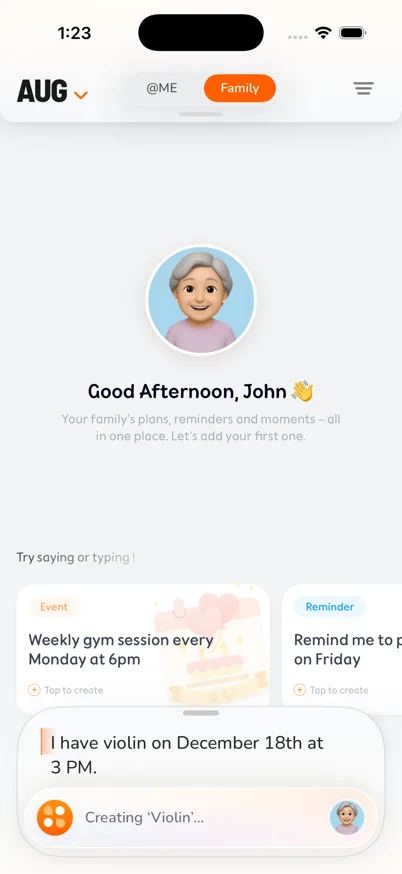
1. Speak and review the request
KIN transcribed the one-time event request and showed the interpreted date and time while creating it.
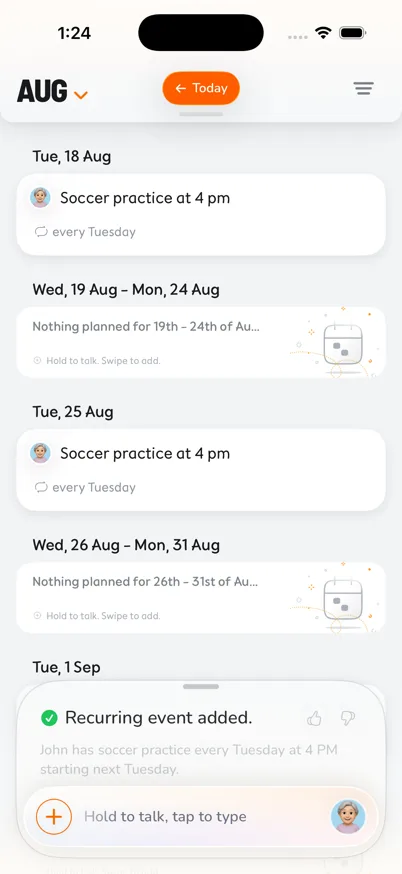
2. Create a recurring family event
The timeline shows Soccer practice at 4 PM on successive Tuesdays, with the recurring-event confirmation visible.
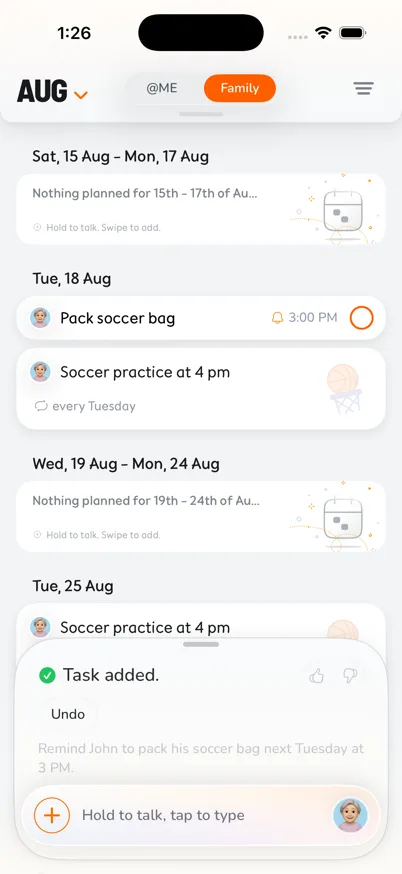
3. Assign a reminder
The spoken reminder became a task assigned to John with a 3 PM deadline beside the related family schedule.
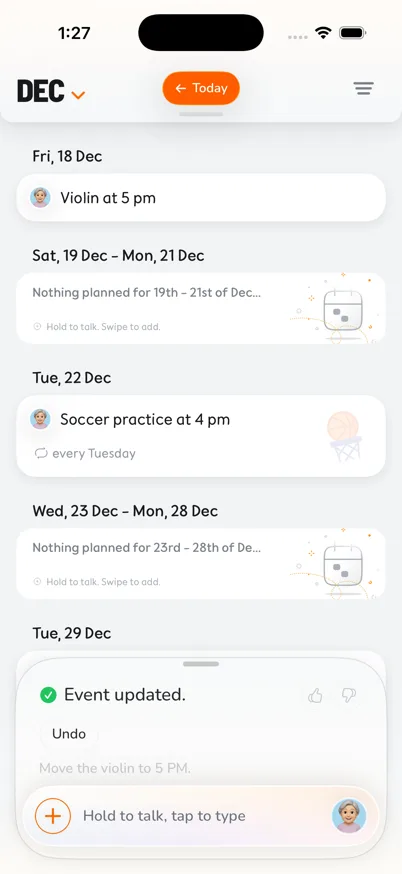
4. Correct an interpreted time
A second voice request moved the same Violin event to 5 PM; the event ID stayed unchanged in the verification run.
What this workflow gives your family
Natural-language capture
Describe a one-time or recurring plan without working through a long sequence of form fields.
Voice or text
Switch to typed entry when the environment is noisy, the detail is private, or speaking is not appropriate.
Create and edit
Use natural language for a new plan or a change, then verify its time, recurrence, assignment, and reminders.
A shared destination
Put the resulting event, reminder, or to-do into the same family timeline used by other household members.
A practical way to start
- 1
Open hold-to-talk
KIN does not rely on an ambient wake word; start voice entry from the app.
- 2
Say the essential details
Include what is happening, when, whether it repeats, and which family members are involved.
- 3
Review before relying on it
Correct any transcription or interpretation mistake before treating the plan as current.
Next, follow the voice event step-by-step guide or use practical voice command templates or browse voice and AI scheduling guides or browse the family calendar guides.
Know the current boundaries
KIN is a dedicated family calendar on iPhone and Android. It does not currently import or sync Google Calendar, Apple Calendar, Outlook, or other external calendars.
Read the evidence-based voice guide →Questions families ask
Does KIN guarantee that every spoken request is interpreted correctly?
No. KIN does not guarantee perfect interpretation. Speech recognition and AI interpretation can make mistakes, so review the resulting plan before relying on it.
Can I type instead of speaking?
Yes. KIN supports typed input as well as voice input. Typing is the better fallback in a noisy room, when a detail is private, or when speech transcription does not catch the request.
Is voice processed only on my phone?
No. KIN's privacy policy says it processes voice inputs and may use service providers, including sending data snippets needed to operate AI features.
Other family setups